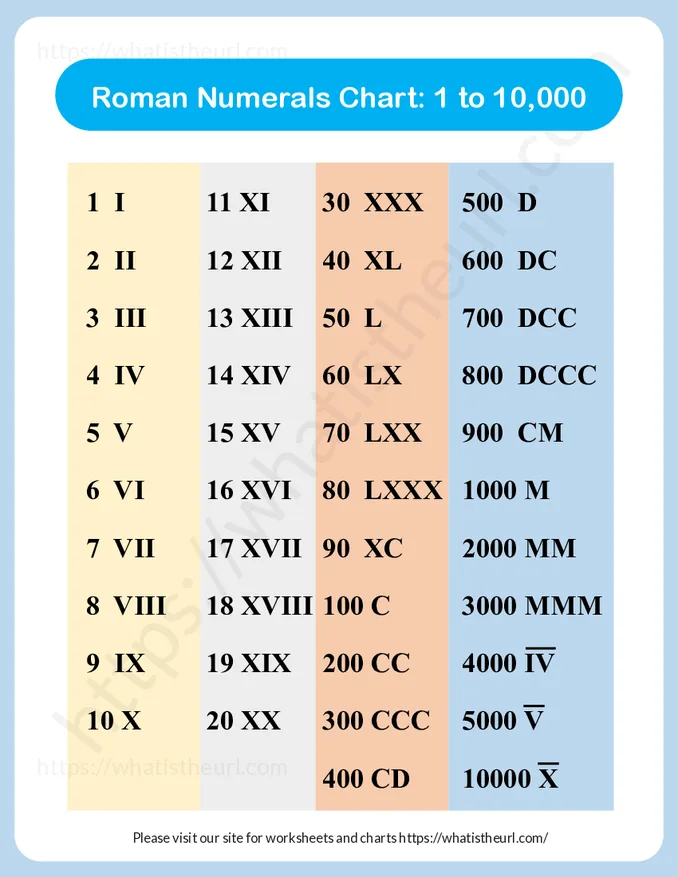
Roman Numbers Numerals Chart from 1 to 10,000
We have prepared a chart based on Roman Numerals from 1 to 10,000 for kids. It contains 1 page. You can below,
Roman Numbers
The following is the textual roman numbers, so you can copy and use it in your own worksheet or PPT.
1 - I
11 - XI
30 - XXX
500 - D
2 - II
12 - XII
40 - XL
600 - DC
3 - III
13 - XIII
50 - L
700 - DCC
4 - IV
14 - XIV
60 - LX
800 - DCCC
5 - V
15 - XV
70 - LXX
900 - CM
6 - VI
16 - XVI
80 - LXXX
1000 - M
7 - VII
17 - XVII
90 - XC
2000 - MM
8 - VIII
18 - XVIII
100 - C
3000 - MMM
9 IX
19 XIX
200 CC
4,000 I̅V̅
Writing Large Roman Numerals in Microsoft Word
Roman numerals larger than 3,999 are traditionally written by placing an overline above the numeral. The overline multiplies the numeral's value by 1,000.
| Number | Roman Numeral |
|---|---|
| 10 | X |
| 20 | XX |
| 300 | CCC |
| 400 | CD |
| 5,000 | V̅ |
| 10,000 | X̅ |
| 50,000 | L̅ |
| 100,000 | C̅ |
| 500,000 | D̅ |
| 1,000,000 | M̅ |
How to Type 10,000 (X̅) in Microsoft Word
Microsoft Word supports the Combining Overline character (U+0305), which lets you place a line above a Roman numeral.
Step 1: Type the Roman Numeral
- For 10,000, type X.
- For 50,000, type L.
- For 100,000, type C.
- For 500,000, type D.
- For 1,000,000, type M.
Step 2: Add the Combining Overline
- Immediately after the letter, type 0305.
- Place the cursor directly after the 5.
- Press Alt + X.
Examples
| Type | Press | Result |
|---|---|---|
X0305 | Alt + X | X̅ |
V0305 | Alt + X | V̅ |
L0305 | Alt + X | L̅ |
C0305 | Alt + X | C̅ |
D0305 | Alt + X | D̅ |
M0305 | Alt + X | M̅ |
Recommended Fonts
- Calibri (best alignment)
- Cambria
- Times New Roman
- Arial Unicode MS
- Segoe UI Symbol
Roman Numerals with Overlines
| Roman Numeral | Value |
|---|---|
| V̅ | 5,000 |
| X̅ | 10,000 |
| L̅ | 50,000 |
| C̅ | 100,000 |
| D̅ | 500,000 |
| M̅ | 1,000,000 |
Tip: The appearance of the overline depends on the font you use. Calibri and Cambria generally produce the best results. For professional documents requiring perfect alignment, consider using Word's Equation Editor or an EQ field.
Additional screenshots